 Tandem
The AI to-do list for your Windows PC
Plan with Juniper right on your desktop. Add tasks from any app in two seconds, get reminders as Windows notifications, and keep it all in sync with your phone.
Quick add from anywhere
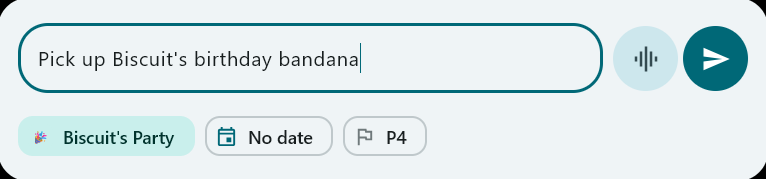
Press Ctrl+Alt+T in any app and a small box drops in at the top of the screen you're on. Type the task, pick a list, date and priority, press Enter, and get back to work. It stays open for the next one, and it has a voice button too.
Juniper on your desktop
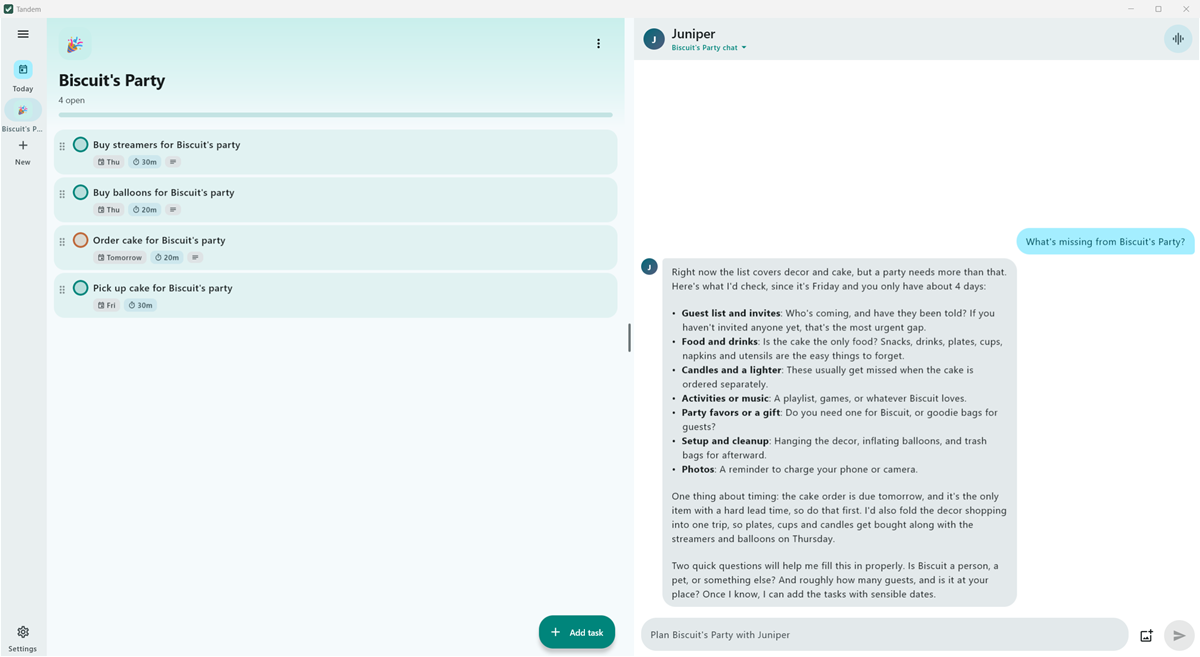
Chat or talk with your AI coach. Drag in a photo of your notes, or paste one, and Juniper turns it into tasks.
Windows notifications
Reminders, plus morning and evening briefings, as native Windows notifications. Click one to jump straight to the task.
Always at hand
Tandem lives in the tray and can start with Windows. Ctrl+N adds a task and Ctrl+, opens Settings.
Your calendars
Add private calendar links, and Juniper plans around your events and warns you about clashes.
In sync with your phone
Sign in with Google on your PC and phone, and lists, tasks and memories sync live. Or keep everything on this PC.
Updates itself
One click installs a new version. Updates are checked to come from Tandem before they install.
Questions
What do I need to run it?
Windows 11, 64-bit, and about 250 MB of disk space. The optional on-device AI downloads 3.7 GB more and needs about 8 GB of free memory.
Does it need administrator rights?
No. Tandem installs just for you, without an administrator prompt, and adds Start menu and desktop shortcuts.
Is it free?
Yes. Bring your own Claude or Gemini key, or use the free on-device AI.
Do I need the Android app too?
No, the Windows app works on its own. If you also use Tandem on your phone, sign in on both to keep your lists in sync.
How does it update?
Tandem checks for a new version when it starts and once a day. Open Settings → About and choose Update: it downloads the update, then closes, installs it and opens again.
Keep exploring
Start planning with Juniper
Tandem is free. Bring your own Claude or Gemini key, or use the free on-device AI.