 Tandem
Plan out loud with a voice to-do list
Talk to Juniper like you'd talk to a friend who's good at planning. It answers out loud and turns the conversation into lists, dates and reminders while you walk, cook or drive.
A real conversation, not a dictation box
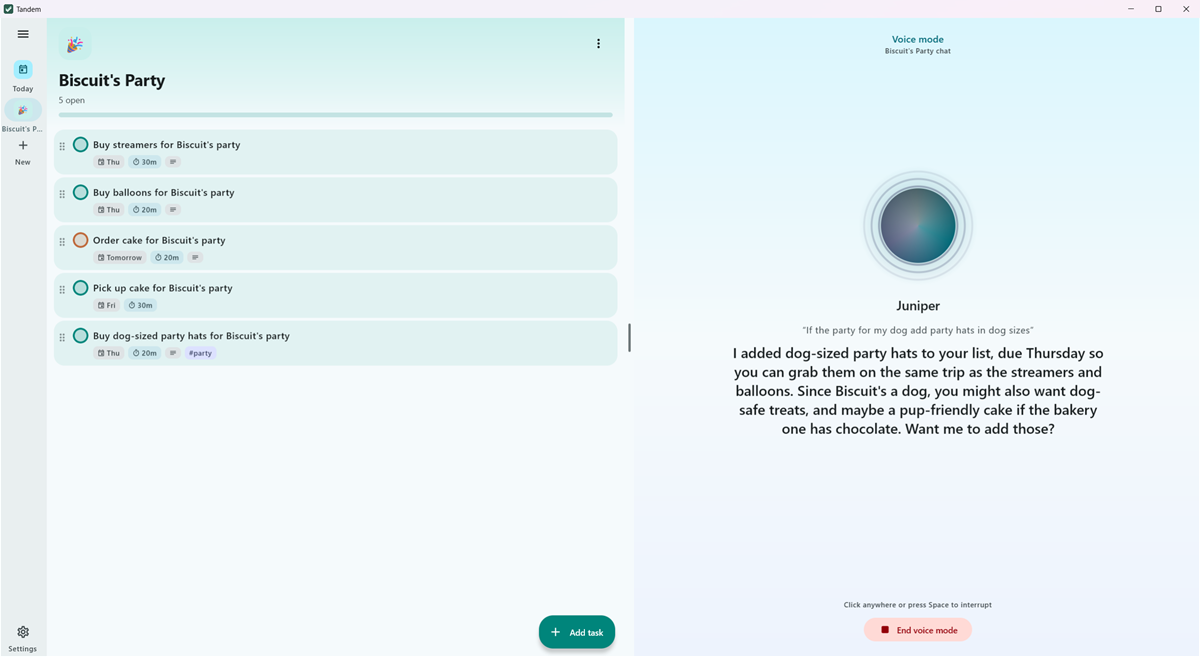
Most voice to-do apps take one command and stop. Tandem's voice mode stays in the conversation: Juniper asks what it needs to know, suggests what you've missed, and keeps your lists up to date as you talk.
Say "I'm hosting dinner Friday, help me get ready" and you'll talk it through together: the menu, the shopping, when to start cooking. Then it's all on your list with dates and reminders.
How voice mode works
-
Start it anywhere
Tap the voice button in the chat. On your phone, also from a home screen widget, the Quick Settings tile or the app icon's shortcut.
-
Just talk
A soft chime means Juniper's listening. Pause for a moment when you're done, and Juniper answers out loud. Tap any time to interrupt.
-
Watch it land
Tasks, dates and reminders appear as you speak. On a foldable's inner screen or a PC, the list stays in view beside the conversation.
Private speech recognition
Your speech is recognized on your device, with no restart beeps and the mic open for your whole turn. Audio never leaves your phone or PC.
Natural voices
Juniper speaks with Amy or Ryan, two natural voices built into Tandem, or your phone's or PC's own voices.
Hands-free on your phone
Voice mode keeps going while you use other apps, with a notification to stop it. It ends when you lock the phone or a call comes in.
Things to say
Anything you'd say to a well-organized friend. A few to try:
- "What's on my plate today, and what should I do first?"
- "Move everything from today to tomorrow, I'm wiped."
- "Remind me to call the dentist at 9:30 tomorrow. Yes, really this time."
- "I've got a week to clean out the garage. Make me a plan."
- "Add oat milk, eggs and something for dessert to groceries."
Questions
Is my voice recorded or sent anywhere?
No. Speech recognition runs on your device and the audio never leaves it. Only the recognized text is used, just like a typed message.
Does voice mode need the internet?
Recognizing your speech doesn't. Juniper's replies come from the AI you choose: Claude or Gemini over the internet, or the free on-device AI, which works offline.
Is voice mode free?
Yes, it's part of Tandem. With Claude or Gemini you pay them for what Juniper uses, as with typed chats; the on-device AI costs nothing.
How do I end voice mode?
Tap Stop, or say "that's all" or "goodbye". It also ends after 15 seconds without speech, and on the phone when you lock it or a call comes in.
Which languages does it understand?
Voice mode understands English.
Keep exploring
Start planning with Juniper
Tandem is free. Bring your own Claude or Gemini key, or use the free on-device AI.