 Tandem
Juniper, with no API key
Tandem AI is Juniper on Tandem's own AI. There's no key to get and no usage bill to watch: one monthly plan, with a month's allowance of AI, on your phone and your computer.
Three plans
Monthly, in US dollars, renewing until you cancel. Each comes with an allowance of AI use for the month.
Light · $4.99 a month
Briefings and a few messages a day.
Regular · $9.99 a month
Juniper through most of your day.
Heavy · $19.99 a month
Plenty of room for long planning chats.
How it works
- Choose a plan in Tandem. Settings → AI → Tandem AI: on Windows and Mac, billed by Polar; on Android, by Google Play; on iPhone, by the App Store.
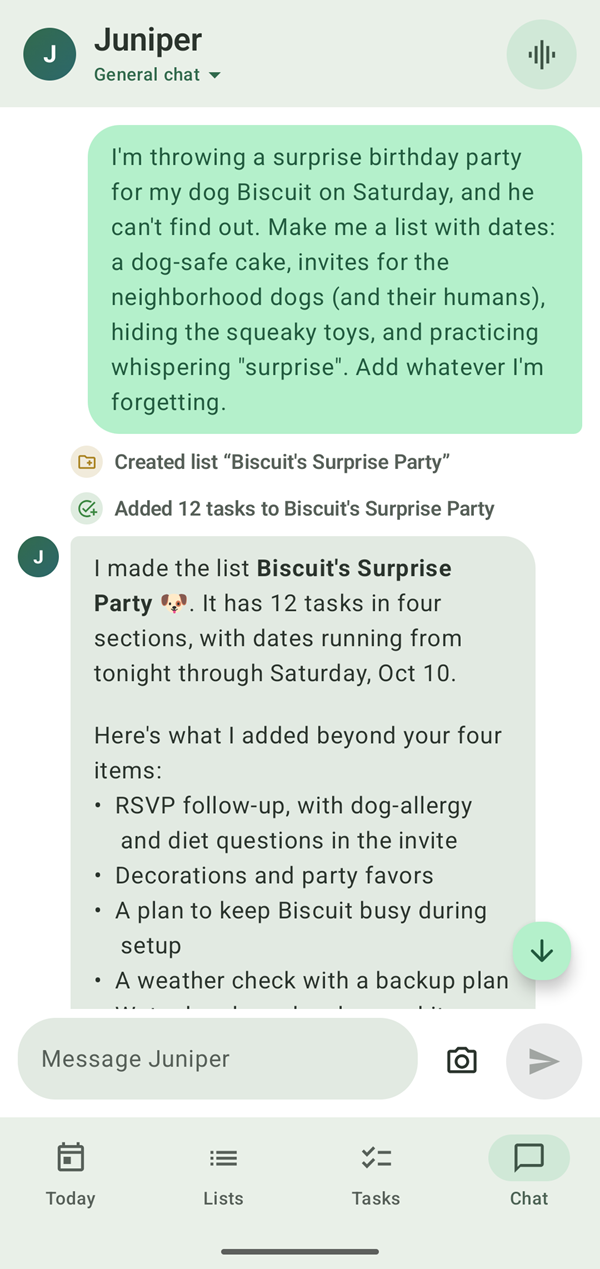
- The same Juniper. Planning chats, briefings, voice mode, photos and web search all work as they do with your own key.
- On both devices. Sign in with the same account, and your plan works on your phone and your computer.
- See your month. Settings → AI shows how much of this month's allowance you've used. If it runs out, upgrade right away or wait for the renewal.
- Cancel any time. In Google Play, in your iPhone's Settings, or with Manage subscription; your plan runs to the end of the month you've paid for.
Your chats aren't kept
With Tandem AI, Juniper's requests go through Tandem's own server to the AI provider, which handles them for Tandem. The server doesn't keep what you say: only how much you've used each day, for your allowance. The privacy policy spells out what goes where.
Get started
-
Install Tandem
On Windows and Mac, from the download page. On iPhone, from the App Store (coming soon). On Android, from Google Play (coming soon).
-
Sign in
Settings → Account & sync → Sign in with Apple or Google.
-
Choose Tandem AI
Settings → AI → Tandem AI, then pick a plan.
Questions
Who can get Tandem AI?
People in the United States. Elsewhere, Juniper works with your own Claude or Gemini key, or the free on-device AI on Android, Windows and Mac.
What happens when I've used my month?
Tandem AI pauses until your plan renews, or you can upgrade to a bigger plan right away. Settings → AI shows how much of the month you've used.
Can I change or cancel my plan?
Yes. On every device, an upgrade starts now and you're charged the difference for the rest of the month; a smaller plan starts when yours renews. Cancel any time with Settings → AI → Manage subscription (or in Google Play for an Android plan, or in your iPhone's Settings for an iPhone plan), and your plan runs to the end of the month you've paid for.
Is there a refund?
If Tandem AI isn't for you, ask within 3 days of first subscribing and we'll review a refund for that first payment. See the refund policy.
Can I still use my own API key?
Yes. Switch between Tandem AI, your own Claude or Gemini key and the on-device AI (on Android, Windows and Mac) any time in Settings → AI. Your chats carry on across them.
Keep exploring
Start planning with Juniper
Free for Windows and Mac, $0.99 for iPhone and Android. Bring your own Claude or Gemini key, add Tandem AI (in the US) from $4.99 a month, or use the free on-device AI on Android, Windows and Mac.